While I’ve personally enjoyed phenomenal productivity with vibe coding, I was just not able to get my whole team to a similar level. I’d read anything on new techniques and tools that would help with giving me more speed or autonomy. By mid 2025, I was heady with thoughts of an awesome future where we would release non-trivial features in days instead of months. I’d have internal tech talks on how although I wasn’t very familiar with our entire code base, I was able to release relatively large features, complete with UI, migrations and all. I’d talk about how if you first spend time on defining a clear and as-unambiguous-as-possible spec, coding agents can pretty much take over coding from you. Initially, my team, was indeed surprised that I was actually able to pull this off and I did manage to pique some interest. I was confident everyone would catch this bug, but (insert sad trombone music here) nothing changed. There were a few engineers working with coding agents here and there, but no org-moving-at-vibe-speed.
We bought all our engineers $100-a-month Claude Code plans, convinced those were tickets to the future. Cut to a couple of months later, why were’t we living in the awesome future still? Why were large features still taking weeks to build? I noticed a strange phenomenon, though. Senior folks whos job was not to be coding full time were killing it. But, junior folks were mostly just saving some time here and there, but then that was pretty much it. I then carefully analyzed why this was the case. Vibe Coding was giving some individuals the boost, but there were several impledements to scaling it.
Challenge #1: Engineers can’t make on-the-fly Product Decisions while working with coding agents
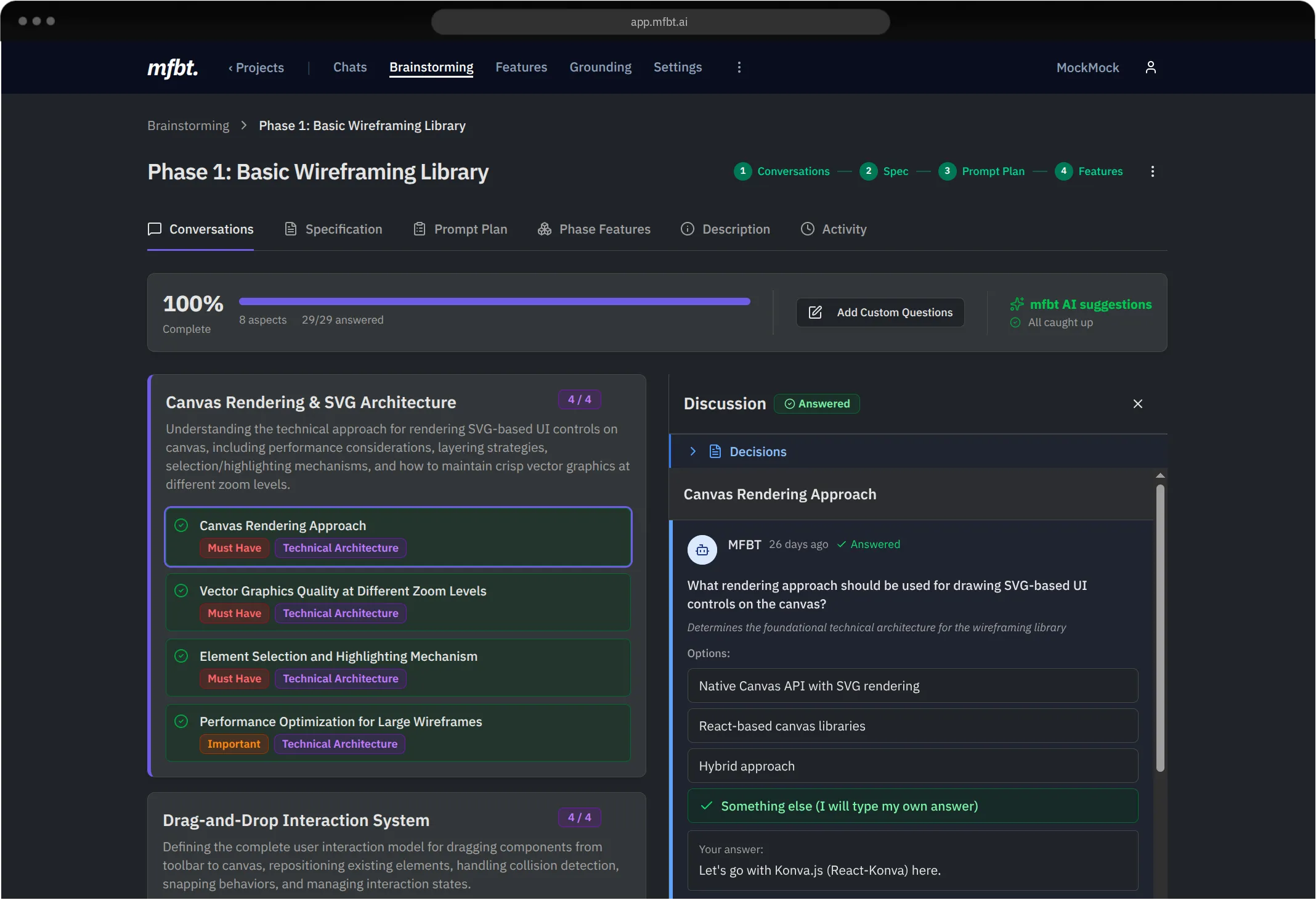
One of the reasons why more senior folks were having success with Vibe Coding was because they were making product decisions on the fly, enabling them to move fast. More junior engineers, sitting on thier terminals(or IDEs), vibe coding, would just freeze. This would tremendously slow down things. They would have a spec ready to go for the coding agent, but those would have gaps and filling those gaps would mean discussions on Slack or meetings and then painfully and manually capturing those decisions and re-generating the spec. Not pretty.
Architectural decisions imposed a similar tax. Many junior engineers were’t comfortable moving forward without more inputs from architects for gaps in the spec that the coding agent discovered in the planning or implemenation phase.
Challenge #2: Local File-based Context Management is a Pain
Unfortunately, much of Vibe Coding currently depends on local, file-based context management, which hinders efficient, horizontal deployment of Vibe Coding. Currently the way we have it is, coding agent grounding: local files. Specs and prompt plans: local files. Multiply that with devs and branches and features, and you have an ugly mess. For us, just managing these files was getting out of hand. Efficiency? Collaboration? Forget about it!
Challenge #3: Creating specs requires synchronous collaboration
One common technique to build features with coding agents is to spend time upfront on building solid specs, ensuring that the coding agent has all the necessary information to generate the code. It’s common practice to use a consumer tool like ChatGPT or Claude to generate the specs by letting it ask us questions about the feature we’re building. This technique was a smart move because LLMs could come up with questions and find gaps that were easy to miss for even the most experienced of product managers. The trouble is, this process wasn’t scalable: not all of those questions could be answered by engineers alone. You needed product managers, designers and architects to all be present to answer those questions. Either, you needed to coordinate and get everyone to sit on this synchronous brainstorming session. Or you had to do it using tools not purpose-built for this task and then do a lot of copying and pasting around. This was a major bottleneck and inefficiency in the process.
Challenge #4: LLM-based Brainstorming for Brownfield Projects is Broken
Don’t get me wrong: LLMs need specs for autonomous development and getting those specs themselves generated in a previous step using LLMs themselves was key to Vibe Coding taking off. The idea is the product of a genius and I wish I had come up with it. Tools like ChatGPT are great for generating specs for greenfield or new projects. But, they suck at doing a good job for existing projects and its not their fault. They don’t have enough context. They need access to your code in order for them to do that. They have access to web search in addition is good, too.
In any case, come to think of it, once you develop a feature or two, a greenfield project essentially turns into a brownfield project. You cannot continue to use something like ChatGPT to generate specs for it. Such specs just won’t cut it. It’ll be like a solution from one of those very high level architects(unfortunately highly paid as well) who’s not in touch with the code anymore. There are bound to be way too many gaps or it could even be outright wrong completely. There is no way coding agents will do a good job depending on such specs.
Vibe Coding is vertical, Vibe Engineering is horizontal
Coding agents help you automate coding, as the name implies. But, software engineering is a lot more than just coding. It involves a lot of folks beyond engineers: product owners, product managers, program managers, architects and designers. Very few products are built by engineers alone. In building software, coding is a very small part of the overall engineering process.
LLMs have shown us a glimpse of the kind of a nitro boost they can provide the coding process. Amazingly, they can also be used in many areas of the software engineering process, providing similar if not way better boosts. While engineers of the constantly tinkering type were able to stitch together tools that were already available to them to make that boost happen for coding, translating that boost to software engineering in general calls for a more deliberate strategy.
So far, all the techniques we’ve seen are about the careful creation of specs and letting coding agents help us write code as autonomously as possible. These techniques are helping boost the productivity of individual engineers. In this sense, Vibe Coding is very vertical. But, with the right harness, you can leverage these powerful agents horizontally, across your teams, bringing that nitro boost to the whole of software engineering—not just coding.
mfbt (short for move fast and build things) is the platform that enables you horizontally leverage agents/LLMs across your teams. You go from Vibe Coding to Vibe Engineering so you don’t stop with agentic coding, but take the full speed advantage of Agentic Engineering. Read on to learn more about how mfbt achieves this.
Vibe Engineering’s three main pillars: Collaboration, Brainstorming and Closing the Loop
To enjoy the true power of Vibe Engineering across your organization, these three main pillars are the ones you need to focus on, apart from the use of vibe coding itself.
Spec as the result of Collaboration and Brainstorming
In mfbt, the spec (technically the spec and the prompt plan) are created from all the collaboration and brainstorming conversations. This way, voices, opinions (and approvals) from all relevant stakeholders are captured and incorporated into the spec, ensuring engineers finally help build something that is truly aligned with what the business needs.
Async-first Collaboration
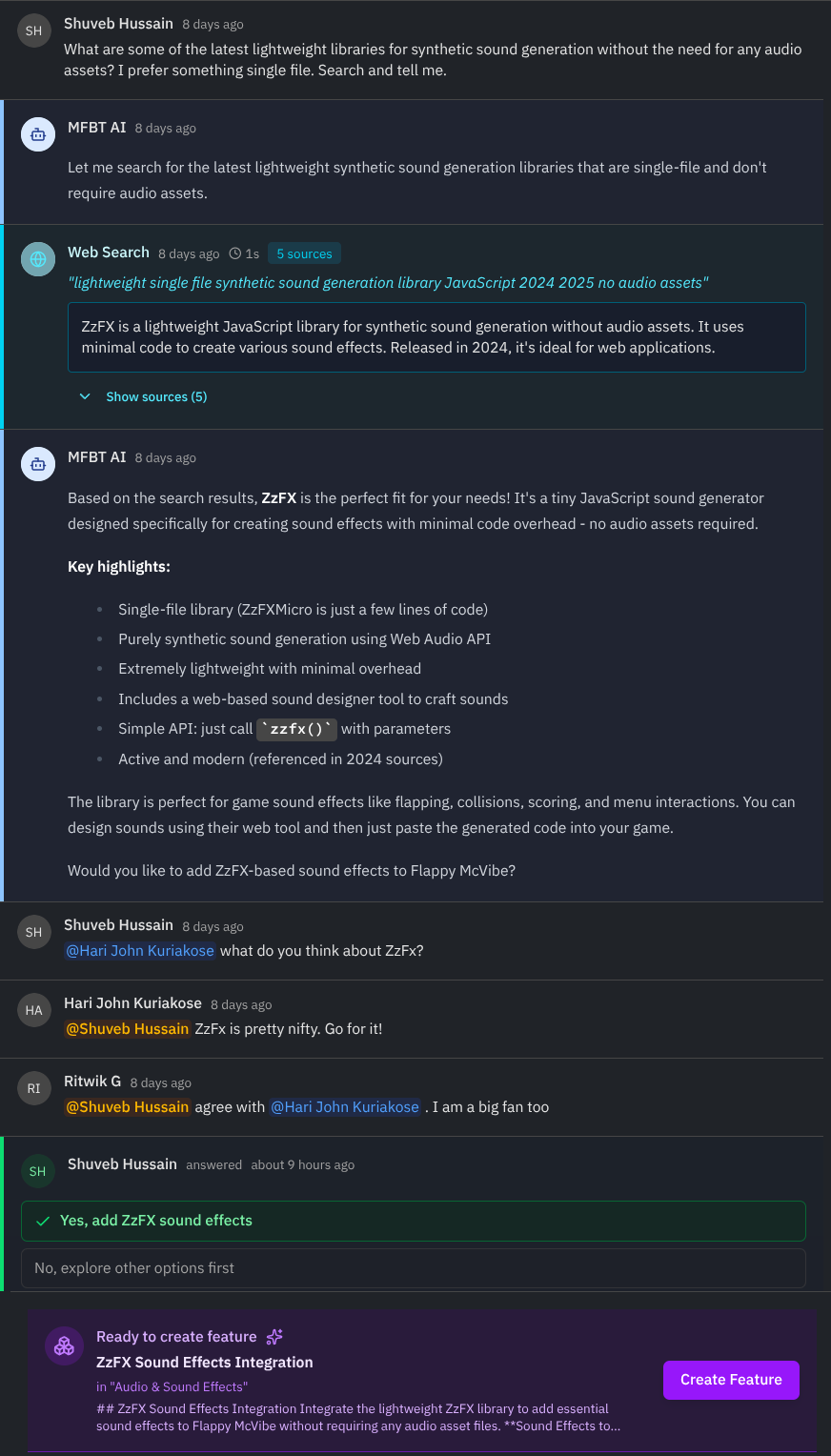
The good thing about moving from ChatGPT to mfbt for collaboration are many, but chiefly, like any other chat-style collaboration, it is async and referenceable.
Specs are grounded and rooted in your codebase
Of course, it’s super important for brownfield projects that specs generated from collaboration are grounded strongly to your codebase. This ensures that the spec, when made available to the coding agent, will actually make sense from an implementation perspective, have the desired results and indeed create features that were envisioned in the team conversation / collaboration.
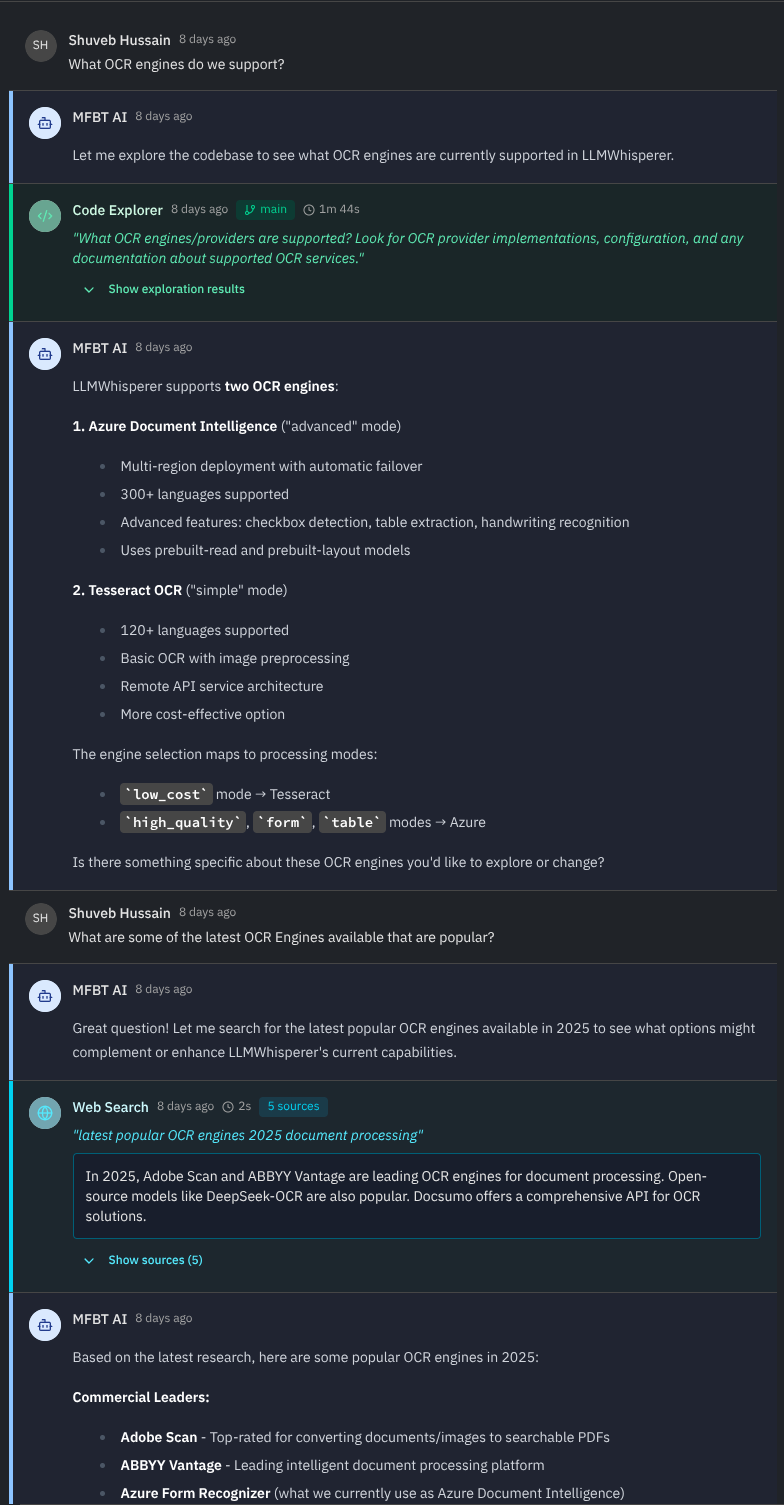
mfbt has more than a dozen agents across the system that help you achieve horizontal Vibe Engineering. One of those agents is the Code Exploration Agent which ensures that the generated spec is aligned well with your codebase.
Based on the up-to-date
Built-in Web Search in conversations means that you and your team does not have to worry about the underlying LLM’s knowledge cut-off date or any knowledge gap it might have. Using a cutting edge library or the latest version of one? No problem.
Collaborate with mfbt AI
You don’t have to stop with collaboration that happens among your team members. mfbt AI is a mention away and — it has full context of not just your current conversation, but about all other conversation threads, your project information, etc. In that sense, it can be your architect, your DevOps advisor or your researcher. @mfbtAI is available on all chat interfaces on the platform to collaborate with.
A powerful combo for your Specs
Generating your feature specifications from collaboration among team members, mfbt AI, the Code Exploration Agent, the Web Search Agent leads to the creation of very high quality specs that have a solid foundation in both what everyone wants as a team and also in your real codebase.
If you come to mfbt from creating specs with tools like ChatGPT, you’ll find what a difference a purpose-built system like mfbt can make! You have to see this for yourself.
A centralized source of truth for your decisions
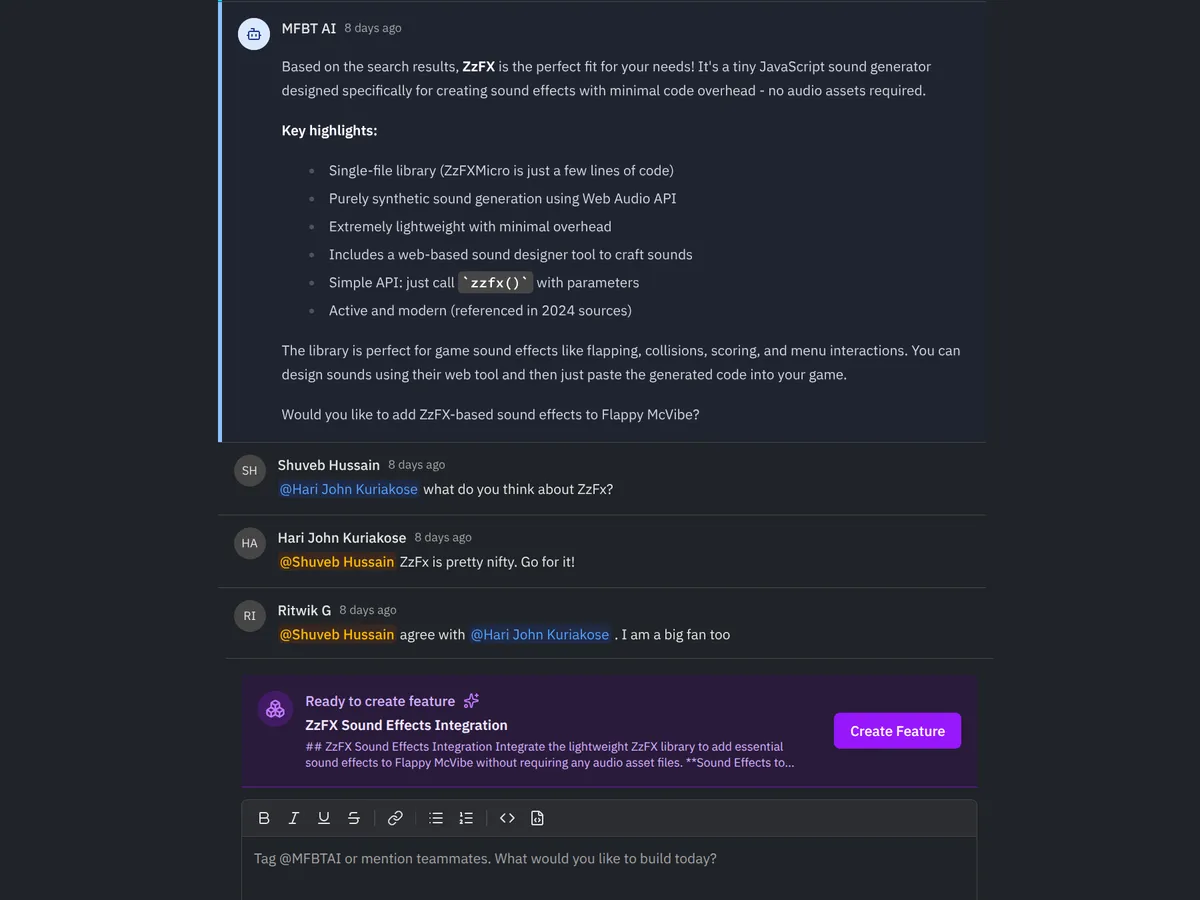
Why is a feature a certain way? Who influenced this? You can always trace it back to the influencing conversation. But, what is also available are closed and open decision points that mfbt’s Decision Summarizer Agent generates for each conversation that ends up influencing a spec. If you’re too busy to catch up on the conversations, Decision Summaries are your TL;DR.
Closing the Loop: From Collaboration to Coding Agent
So, how do we make specifications available to coding agents? This is done in the least intrusive, most frictionless way as possible: using mfbt’s project-level MCP servers. The MCP servers also expose implementation metadata, allowing coding agents to keep churning features.
Want to set up a Ralph Wiggum loop now that detailed spec based on the team collaboration that’s available? mfbt’s MCP servers make this trivial to achieve.
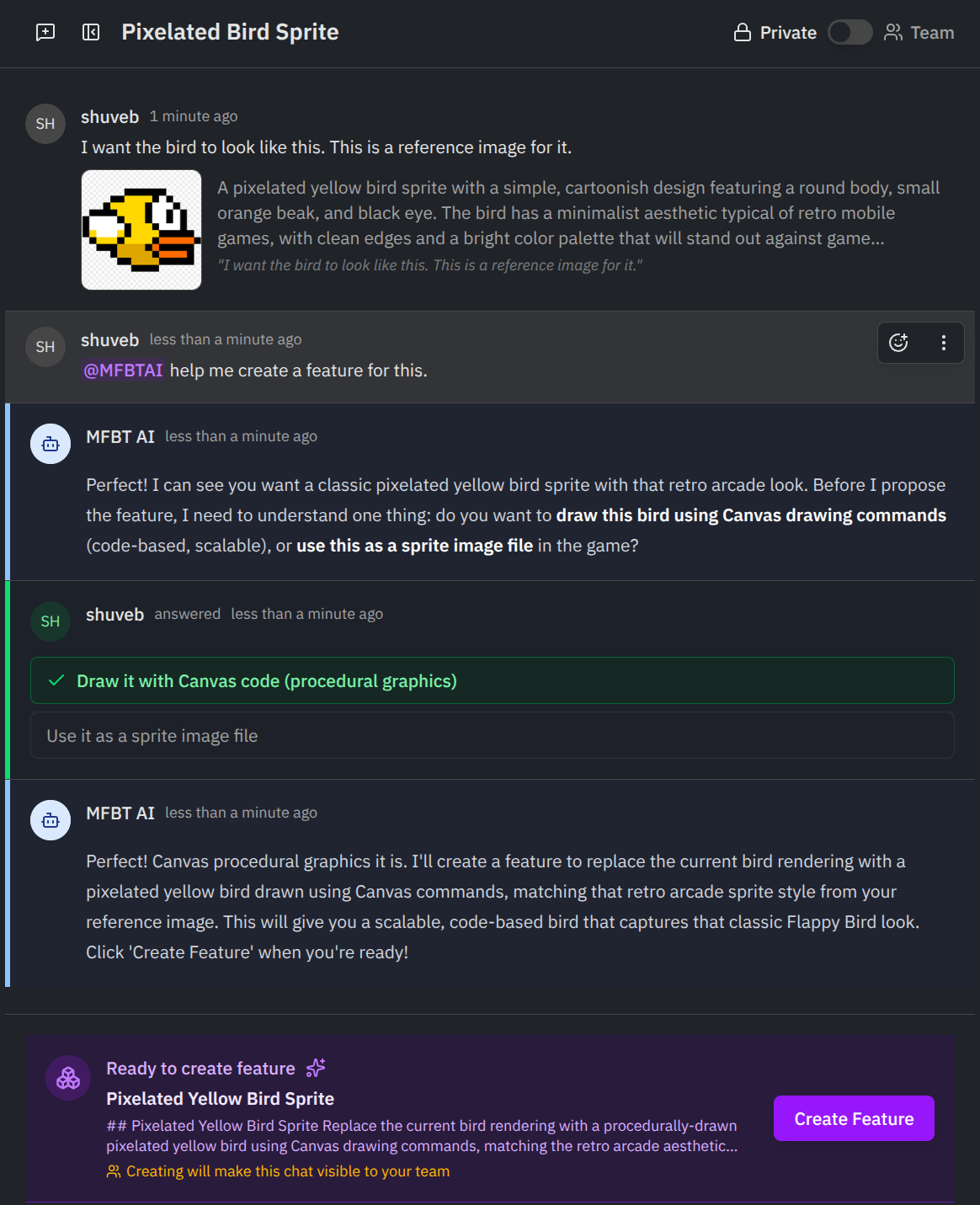
Use images to convey ideas to coding agents: You can upload screenshots, diagrams, or any other visual aids that help illustrate your ideas. mfbt’s Image Annotation Agent then understands your uploaded image in the context of your conversation and code and then generates a textual description of the image in relation to your code, which can be used to enhance the specification. Your images are then embedded into the specification for the coding agents to access and use, as they implement your feature.
Closing the Loop: From Coding Agent to Collaboration
mfbt exposes a centralized agents.md file to your codinge agents. But, it creates private versions for every user + branch combo. We have seen in the past that updates to files such as CLAUDE.md or .cursorrules were highly engineer dependent and although these files would be committed to repos, updates from different engineers would be in different styles and densities.
Under mfbt, while coding agents can update the user’s agents.md file, they are discouraged to do so. Rather, coding agents update implementation notes for every individual feature developed and this triggers mfbt’s Grounding Agent, which then updates the global agents.md file with the latest information, uniformly maintaining style and information density.
Once a user merges their branch into the main branch, they can merge their agents.md changes into the global one via the Grounding Agent.
Update Conversations from Coding Agent: there is no need for engineers update conversations from the mfbt UI. They can can do it from the coding agent. mfbt keeps the coding agents updated on who on the team plays what role. Engineers can add to the conversation for instance tagging all product architects.
Upload screenshots to conversation: Engineers can add screenshots to conversations directly from the coding agent as well.
mfbt is developed on mfbt
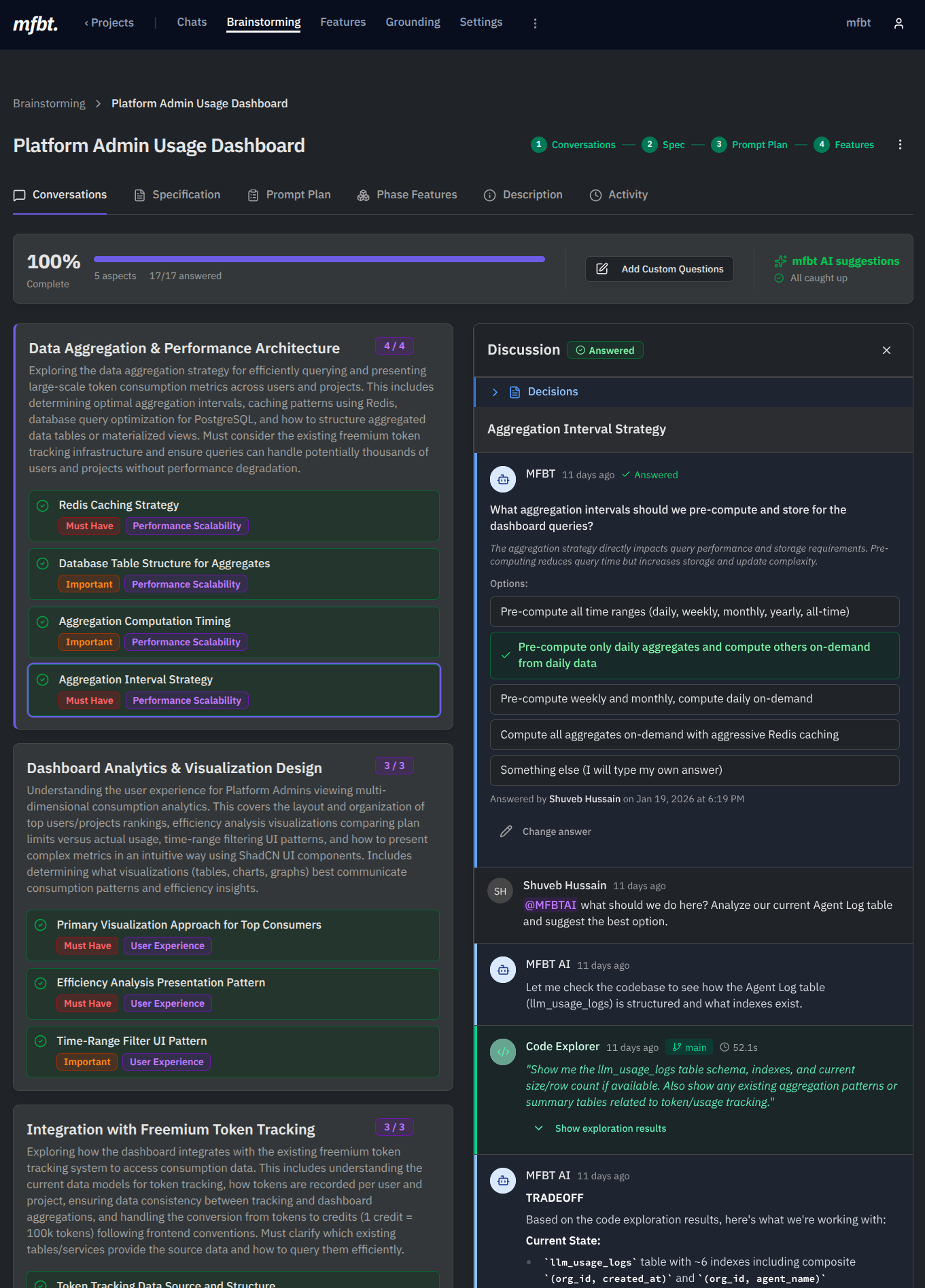
Before mfbt, I used to move between general purpose chat tools, copying and pasting various bits or text and markdown around. As the project’s complexity grew, it became painful. Providing these tools context of the implementation wasn’t easy. Of course something like Claude Code’s Plan Mode can be useful here but, only for the scope of small and medium features. For larger features or whole modules however, it falls painfully short. Here’s a screenshot of how mfbt’s Platform Admin dashboard was brainstormed and developed in a couple of hours.
Once mfbt reached a certain maturity level, it became fully self-hostable. In fact, whenever the team needs new mfbt features, they simply start a chat, use mfbt AI to explore the code and figure out what it might take to add a new feature, pull in different team members as needed, build a spec and just ask a coding agent to implement it.